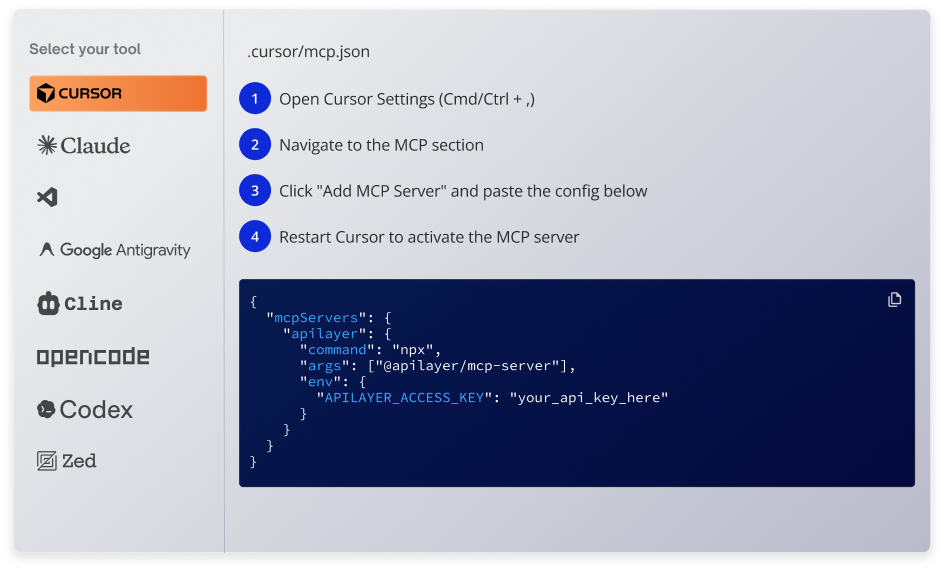
The IPstack MCP Server gives your coding assistant instant access to real-time IP geolocation, ASN, timezone, currency, and threat intelligence. For any IP, anywhere on the planet.
IPstack MCP exposes the IPstack API to AI tools via Model Context Protocol (MCP), allowing you to access IP data as structured tools instead of raw HTTP calls.
What can I do with IPstack MCP?
You can fetch geolocation data (country, city, ISP, timezone, etc.) directly inside your AI workflows to power personalization, analytics, fraud detection, and automation.
Does IPstack MCP support all API endpoints?
Yes, IPstack MCP supports all IPstack endpoints, including standard lookup, bulk requests, and request-based checks, all exposed as structured tools for use inside your AI workflows.
Do I need to pay extra to use IPstack MCP?
No, there is no additional cost for using IPstack MCP. You only pay for your IPstack usage based on your plan. MCP itself is just the access layer, so once you have an auth token, you can use IPstack through MCP without any extra charges.
Do I need to modify my backend to use IPstack MCP?
No, you don’t need to modify or build any backend. Just configure MCP in your AI tool, add your IPstack auth token, and start calling endpoints directly. MCP handles the integration layer, so you can skip wrappers, servers, and custom infrastructure.
Does IPstack support IPv6?
Yes. IPstack MCP supports both IPv4 and IPv6 addresses.